When to Upgrade from Shopify to Custom Ecommerce for Growth
Store growth alone doesn’t mean it’s time to leave Shopify. The right time to upgrade from Shopify to custom ecommerce is when recurring platform limits, checkout requirements or integration gaps hinder essential business operations, and a tailored platform can solve those problems more effectively. If Shopify still supports your customer journey and operations without costly workarounds, staying put may be the more practical choice.
It makes sense to want more control as your store grows, but moving platforms is a major decision, not a milestone to reach simply because sales are rising. The key question is whether your current setup can keep pace with how you need to sell, serve customers and manage the business.
This article explains how checkout performance, platform constraints and integrations can signal that it’s time to consider custom ecommerce. It also covers migration requirements to weigh before making a change, helping you distinguish a genuine growth barrier from a problem Shopify can still handle.
Key Takeaways
- Consider an upgrade when checkout requirements or repeated friction are getting in the way of a smoother customer journey.
- Separate genuine platform constraints from problems that can be addressed within your existing Shopify setup.
- Assess whether a custom storefront and back end would give your business the flexibility its sales experience requires.
- Map how customer, inventory, ERP and CRM data need to move between systems before deciding on a migration.
- Weigh the operational changes and migration work alongside the benefits of a more tailored ecommerce platform.
Checkout conversion and revenue impact
There is no fixed revenue or order volume that makes moving from Shopify worthwhile. Consider it when checkout constraints repeatedly obstruct sales or operations, and a custom platform can address a defined business need.
Checkout Customisation and Conversion
Checkout customisation adapts the purchase steps and storefront experience to how customers browse, choose and pay. It matters when a standard flow creates friction, such as requiring customers to navigate unnecessary steps before placing an order.
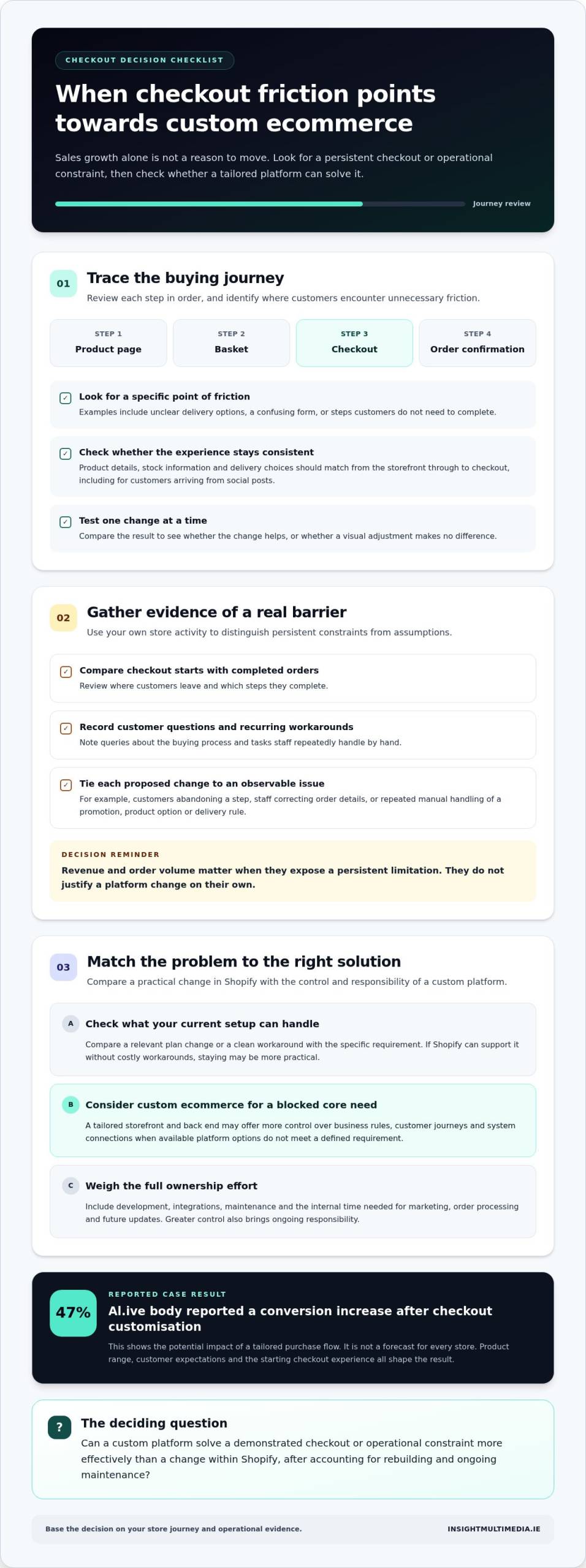
Review the journey in sequence: product page, basket, checkout and order confirmation. Compare where customers leave with the steps they complete, then identify specific friction, such as unclear delivery options or a confusing form. Testing one change at a time helps show whether an improvement works or a visual change makes no difference.
Al.ive body reported a 47% increase in conversion after customising checkout. That result shows the potential impact of a tailored purchase flow, not a forecast for every store. Product range, customer expectations and the starting checkout experience all shape the result.
Storefront and checkout functionality should work as one experience across channels. For example, a customer arriving from a social post should see product details, stock information and delivery choices that match what appears at checkout. If those details are inconsistent, the journey feels disjointed and customers may hesitate before ordering.
Revenue and Order Volume
Revenue and order volume justify a platform change only when the demands they create expose a persistent limitation, not simply because sales have grown. Ask whether a custom solution can remove a specific constraint affecting conversion, order handling or the customer experience.
For example, a store with frequent repeat orders may need a purchase journey that makes reordering simpler. Another business may need checkout logic that reflects its product combinations or delivery choices. In each case, tie the proposed change to an observable issue, such as customers abandoning a step or staff manually correcting order details.
Assess the opportunity using your store data. Compare completed orders with checkout starts, review customer queries about the buying process, and note recurring workarounds. Then consider whether the expected operational or conversion benefit justifies rebuilding and maintaining a different platform. Order volume alone cannot answer that.
Store functionality also affects the decision. If a promotion, product option or delivery rule requires repeated manual intervention, record how that task affects the order journey. If Shopify can support the required change cleanly, an upgrade may add unnecessary complexity. If a core requirement remains blocked, custom ecommerce may offer more suitable control.
For Irish retailers selling through several channels, keep the decision grounded in the full customer journey. Test changes against real checkout behaviour and confirm that product, basket and payment steps remain clear. A custom platform is most compelling when it solves a demonstrated constraint, rather than chasing a conversion figure achieved by another brand.
Custom ecommerce development compared with off-the-shelf platforms
An off-the-shelf platform provides a ready-made foundation, while custom ecommerce can shape the storefront and back end around specific business requirements. Compare capability, ongoing ownership and migration work, not just flexibility.
Shopify Plans and Platform Limitations
Shopify plans, including Shopify Plus and standard plans, offer different commercial options and capabilities. Compare the specific features, payment arrangements and platform constraints relevant to your store before deciding whether a higher plan or custom build is a better fit.
A custom ecommerce platform gives developers greater control over how business rules, customer journeys and system connections are implemented. That control can support scalability when your requirements exceed available platform options, but it also means taking responsibility for ongoing development and maintenance.
List the limitations affecting daily work, such as a product rule that needs manual handling or a marketing workflow that cannot connect cleanly with store data. Then compare a plan change, a practical workaround and a custom build against that same requirement. A broader platform does not automatically solve every operational issue.
Payment Fees and Total Ownership Costs
Total ownership cost includes more than the platform subscription. Compare payment processing, plan-related charges, development, integrations, maintenance and the internal time needed to manage the system.
Payment costs depend on the provider, transaction setup and contractual terms, so assess them using your own order profile and current statements. Lull achieved a 25% cost reduction across infrastructure and payment processing after rebuilding its infrastructure. That outcome illustrates a possible benefit, not a saving to assume for another business.
For a fair comparison, model the same operating period and requirements for each option. Include developer time for changes, plus the work involved in supporting marketing, order processing and future updates. If customisation removes recurring workarounds, include that operational change rather than looking only at visible platform fees.
Migration Risks and Hidden Costs
Migration risks are problems with data, functionality and customer experience that can emerge when a store moves platforms. They matter because products, customer records, order history, redirects and integrations must work together after launch.
For an Irish store serving EU customers, design the platform to support GDPR related data handling, VAT configuration and relevant ecommerce information for customers. Payment processing should also fit the store’s chosen provider and transaction workflows; build these needs into the requirements before development begins.
Map each data set and connected system before planning the move. Test product records, customer accounts, order history, payment flows and key page redirects in a staging environment. Hidden work can include rebuilding features, correcting data, reconnecting services and supporting staff as processes change. A tailored ecommerce platform plan can connect these requirements with the intended store experience.
In a comparison, remember that custom ecommerce development covers both the front end and back end of a website. Define that scope alongside the requirements for the move, then assess whether the proposed work addresses both areas. This keeps the migration comparison focused on the full development scope, not just storefront changes.
Storefront and headless commerce capacity
A custom commerce build can shape both the front end and back end around your store’s requirements. The decision depends on whether that control improves the experience customers use and the tools your team manages.
Custom Store Design and User Experience
Custom store design creates a storefront around your products, brand and customer journey rather than fitting every detail to a preset layout. For example, a retailer selling made-to-order furniture might need product pages that explain finish choices before customers add items to their basket.
That design should connect visual choices to practical tasks. Map a customer’s route from a Dublin campaign landing page to product selection, delivery details and purchase. Then identify where the current storefront restricts useful content, navigation or product information. A custom front end can address those requirements while keeping the commerce functions working behind the scenes.
Headless commerce separates the storefront presentation from the commerce back end. It can suit a business that needs different storefront experiences across channels, such as a main website and an app. However, separation also means teams must coordinate changes between the presentation layer and the systems managing products and orders.
Traffic, Performance and Flexibility
Traffic alone does not determine whether an architecture needs to change. A clearer signal is a specific storefront need that has become difficult to deliver, such as presenting different product information to distinct customer groups or maintaining consistent content across sales channels.
Use a practical test: list the customer journeys your store must support, then compare them with the current storefront. For instance, a Galway retailer might need a campaign page for a seasonal range, with product availability and delivery information kept consistent with the main store. Customisation is relevant when the existing setup cannot support that journey cleanly.
Do not treat a million visits as an automatic reason to rebuild. First assess actual traffic patterns, the pages receiving demand and the customer tasks those pages support. Architecture matters when it helps the business deliver those journeys reliably, not because a large number sounds like a growth milestone.
Support and Store Management Tools
A storefront must work for the team maintaining it, not just for customers. For example, if staff update product descriptions, images and campaign content, clarify which tools they will use and whether those tasks require developer involvement.
Before choosing headless or a fully custom platform, document who manages each task, including product updates, content changes and order workflows. A solution that gives the design team greater control may add coordination needs for the people managing commerce operations. Compare those responsibilities with the tools your team already uses.
Custom storefronts are most useful when distinctive design and specific customer journeys support a clear business need. If Shopify already enables your team to manage content and serve customers effectively, a new architecture may add complexity without improving the experience.
Customer, inventory, ERP, and CRM integrations
Integrations connect your ecommerce store with the systems that manage customers, stock, orders and business records. They become a growth concern when teams repeatedly transfer information between Shopify and tools such as an ERP or CRM.
Start by tracing one order from purchase to fulfilment. A customer places an order, inventory changes, payment details are recorded and the fulfilment team receives the required information. If staff must copy order details into another system, identify where the process breaks and which system should hold the authoritative record.
Inventory connections need clear rules for stock updates. A retailer selling the same item online and through a physical shop needs available quantities to reflect sales from both channels. If updates arrive late or product records differ, customers may see inaccurate availability. Map how stock changes travel between the ecommerce platform, inventory system and any point-of-sale software.
ERP integrations carry operational information, including orders and product records, between commerce and business management systems. CRM integrations connect customer activity with records used by sales or service teams. For instance, a support representative may need to see a customer’s recent order before answering a delivery query. Define what information each team needs, who can update it and where changes should appear.
Before considering a custom build, document each integration in a simple register:
- System and purpose: name the ERP, CRM, inventory tool or other connected system, and explain its role.
- Data exchanged: list the records shared, such as product details, stock levels, orders or customer updates.
- Direction and timing: state which system sends each update and when the other system needs it.
- Failure handling: describe how staff identify and correct a missing or inaccurate update.
This map helps separate an integration gap from a process problem. If Shopify already supports the required connection, clearer data rules or workflow changes may address the issue. If a core enterprise system needs specific data flows that existing integrations cannot handle, custom ecommerce development may provide greater control. Base the decision on actual system requirements, not the number of tools alone.
Scaling also increases the impact of data errors. A product record used across multiple sales channels needs consistent descriptions, identifiers and availability. During a migration, test representative customer, order and inventory records across connected systems before launch. Confirm that updates reach the intended destination and teams can identify errors without relying on manual comparisons.
Customisation is most useful when integrations support a defined business process that standard connections cannot serve effectively. For an Irish retailer managing online orders alongside warehouse and customer service operations, the key signal is repeated friction between systems, such as duplicate entry or conflicting records. Resolve those specific requirements before choosing the platform architecture.
What are the limitations of Shopify for complex ecommerce businesses?
Shopify’s limits matter when a store’s essential requirements cannot be handled cleanly through its existing setup. Complexity alone is not a reason to move: identify the specific constraint, its effect on staff or customers, and whether a workable platform change can address it. Deciding when to upgrade from Shopify to custom ecommerce starts with that evidence, not assumptions about growth.
Product rules can become difficult to manage when different items need distinct purchase conditions. For example, a retailer selling both ready-to-ship goods and made-to-order products may need different availability messages, delivery information or order handling. Map these requirements across product pages, baskets and order processing. If the team relies on repeated manual corrections, the current configuration may not fit the operation.
Pricing and catalogue structures also deserve scrutiny. A business serving trade buyers and individual shoppers may need different product visibility, pricing logic or account journeys. Write down the rules for each customer group, then test representative products against them. If the team relies on separate spreadsheets or repeated exceptions, the friction points to a process or platform constraint that needs closer assessment.
Complexity can arise from operations, not just the storefront. A retailer coordinating stock across a warehouse, physical shop and online store needs dependable records and clear ownership of updates. If staff regularly reconcile conflicting information by hand, document where the mismatch starts and which system should control the record. That evidence helps distinguish an integration issue from a platform limitation.
Customisation has trade-offs. A tailored solution can support specific workflows, but the business also takes responsibility for maintaining them as products, systems and customer needs change. For example, a new delivery option may require coordinated updates to product information, checkout logic and fulfilment processes. Include that ongoing work in the decision, not just the initial build.
Use these signals to assess whether Shopify still fits:
- Repeated workarounds: staff manually correct product, pricing or order information.
- Unmet business rules: customer groups or product types need journeys the current setup cannot support effectively.
- Disconnected operations: teams reconcile stock, orders or customer records across systems.
- Change bottlenecks: routine improvements depend on complicated workarounds or disrupt other store functions.
A practical way to decide when to upgrade from Shopify to custom ecommerce is to test each issue against the actual requirement and consider whether a configuration or process change would solve it. If core workflows remain restricted, explore a custom ecommerce platform solution built around those needs.
Insight Multimedia: Custom Website Design
Insight Multimedia can help shape a tailored ecommerce experience when Shopify’s constraints affect essential customer journeys or store operations. Its E-commerce Platform Development can support a platform built around your business requirements, while Custom Website Design can bring a distinctive storefront and clear user experience together.
Consider this next step when you have identified specific needs, such as a more suitable customer journey, bespoke store functionality or a connected digital experience. Search Engine Optimisation (SEO) can also support visibility as your ecommerce presence develops.
To discuss your ecommerce plans, contact Insight Multimedia.
Make your next ecommerce move with purpose
The decision about when to upgrade from Shopify to custom ecommerce is strongest when it starts with a clear business case, not pressure to adopt something new. Turn the constraints you have identified into a focused brief: what must change, which customer or team benefits, and how you will judge whether the new experience works.
That brief can also guide the shape of your digital ecosystem. Insight Multimedia brings together E-commerce Platform Development and Custom Website Design for businesses that need a more tailored online store. Where a native app supports the customer experience, Native App Development can form part of the wider digital plan.
A deliberate next step is to discuss your requirements and explore a solution aligned with your growth plans. Discuss your ecommerce plans with Insight Multimedia, and move forward with a clearer vision for your store.
Frequently Asked Questions
How do Shopify and custom ecommerce differ in features, flexibility, ownership, and scalability?
Shopify provides a hosted store with commerce tools and extensions, while custom ecommerce can shape workflows, integrations and customer journeys around your requirements. The right time to upgrade from Shopify to custom ecommerce is when platform limits block a clear business need, such as a specific checkout or connection to internal systems. Ownership isn’t automatic: agree who controls the code, data, hosting and ongoing changes. Custom builds also require maintenance and technical oversight.