CMS for Small Businesses in Ireland: Choosing a Platform
A business can move to a different CMS later, but migration can be complex and costly. Choosing a CMS for a small business in Ireland means looking beyond launch: the platform should suit how your team works now and provide a sensible path as your needs change.
It’s understandable to focus on ease of use and appearance, especially when you need to keep content fresh without relying on a developer for every update. But the right choice also depends on your business, how often you publish, which tools your site needs to connect with and how you expect it to grow.
This guide explains how to weigh those needs, when WordPress may be a good fit, and what to plan for with search visibility, maintenance and future migration. You’ll have a clearer framework for choosing a CMS that supports your business today without making tomorrow’s changes harder than necessary.
Key Takeaways
- Match your CMS to your business type, publishing habits, team skills, integration needs and plans for growth.
- Assess WordPress for flexible, content rich websites, and factor in plugin choices, SEO structure and ongoing updates.
- Plan for a possible migration from the start by keeping content and site structure organised and choosing platforms with future needs in mind.
- Make sure your team can update key pages without relying on a developer for routine changes.
- Choose a platform that can support new content, features and commercial goals as your business develops.
Choosing a CMS based on business needs
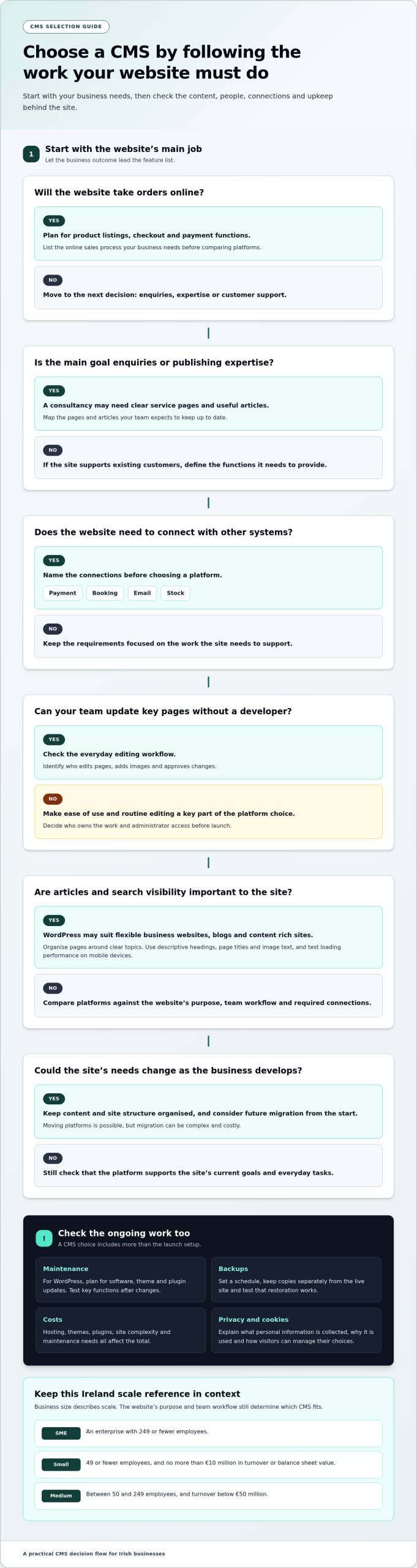
Start with the business outcome, not a feature list. A consultancy seeking enquiries needs clear service pages and useful articles. A retailer taking orders online needs product listings, checkout and payment functions. Your CMS should support the work that brings customers to your business, rather than add tools your team will not use.
Use these steps to compare platforms against practical requirements:
- Define the goal: decide whether the site must generate enquiries, publish expertise, sell products or support existing customers.
- Map the content: list pages, articles, product details and staff profiles the team expects to update.
- Check everyday tasks: identify who will edit pages, add images and approve changes.
- Plan connections: name the payment, booking, email or stock systems the website needs to work with.
- Test performance: assess loading speed and whether content can be structured clearly for search engines.
Business size gives context, but it does not select the CMS for you. In Ireland, an SME is an enterprise with 249 or fewer employees. A small enterprise has 49 or fewer employees and no more than €10 million in turnover or balance sheet value. A medium enterprise has between 50 and 249 employees and turnover below €50 million. These categories describe scale; the website’s purpose and team workflow still decide which platform fits.
Your business structure matters when setting access and responsibilities. A sole trader business in Ireland legally comprises one person, while a limited company must register with the Companies Registration Office and file company reports and accounts each year. Whatever your structure, decide who owns the domain, controls administrator access and approves published content. Record these responsibilities before choosing a CMS, particularly if an accountant, employee or agency will manage parts of the site.
For GDPR and cookies, plan pages and settings that explain what personal information your site collects, why it is used and how visitors can manage their choices. For example, a booking form should request only the details needed to handle an appointment, while analytics and marketing tools should be reflected in your privacy and cookie information. Treat these as launch requirements, not last-minute design additions.
Irish businesses may also explore Trading Online Scheme vouchers of up to €2,500. They may be available to businesses that demonstrate a credible plan for trading online. Include the proposed CMS, online sales process and business objectives in that plan. Retailers mapping the functions their online shop needs can also review e-commerce website planning in Ireland.
WordPress flexibility, plugins, SEO and maintenance
WordPress suits small and medium-sized business websites, blogs and content-rich sites. Themes, plugins and structured content make it adaptable, but every choice should serve a clear business purpose.
Hosting, Themes and Maintenance Costs
Hosting keeps a WordPress website available online, while a theme shapes its visual framework. Compare hosting capacity, support arrangements and renewal terms, then assess whether a theme can accommodate the pages your business needs. List essential functions before selecting a theme or estimating ongoing costs, since plugin requirements also affect the setup.
There is no single cost for a CMS website in Ireland. Hosting, theme and plugin choices, site complexity and maintenance needs all affect the total. The price depends on the specific requirements and is set after a quote request.
Security, Backups and Maintenance Risks
Outdated WordPress software, themes or plugins can create security weaknesses. Incompatible updates can also disrupt forms, layouts or checkout functions. Regular updates and security patches are essential for CMS security and maintenance. Assign someone to review update notices and test key site functions after changes, rather than leaving software unattended.
Backups provide a recovery point if an update causes problems or content is lost. Set a clear backup schedule, store copies separately from the live website and test that restoration works. For example, an online retailer should check product pages and checkout after maintenance.
WordPress can support a simple brochure site or a larger editorial website, but its flexibility needs careful management. Install plugins for specific tasks, such as adding a booking form or managing page metadata. Overlapping tools can complicate updates and affect loading speed, so remove plugins that no longer serve a live function.
For SEO, organise pages around clear topics and use descriptive headings, page titles and image text. A local accountancy practice, for example, could separate service pages from practical tax articles. This helps visitors understand each page’s purpose and gives search engines a clearer content structure. Keep layouts lightweight and test loading performance on mobile devices.
Before launch, document who handles WordPress updates, backups, plugin licences and access permissions. Review those responsibilities whenever staff or suppliers change. If your team has limited time for technical upkeep, factor that recurring work into your platform choice rather than treating maintenance as an occasional task.
When your website needs a distinctive design alongside practical publishing tools, custom website design can bring visual choices and business requirements together.
CMS migration and platform selection
Switching platforms is possible, but migration can be complex and costly. Compare the work involved with the benefits before choosing a CMS.
Comparing CMS Platforms
WordPress suits flexible business sites, blogs and content-rich websites. Shopify, Wix and Squarespace are also options, but compare their content tools, shop functions, design controls and integrations with your priorities. A retailer may prioritise products and checkout, while a consultancy may focus on service pages and articles. The best CMS depends on those requirements, not a universal ranking.
For Irish VAT and EU sales, choose a platform whose commerce setup can handle the tax rules your business must apply. The CMS alone does not determine VAT treatment. Check its tax settings and connected commerce tools against your products and sales arrangements.
Payment and invoicing connections depend on the CMS and the tools selected. Map the payment gateway, such as Stripe or PayPal, and invoicing system, such as Xero, then confirm that a suitable plugin, app or API connects them. Test order totals, payment status and invoice records before launch.
CMS Platforms and Website Builders
A CMS gives a business a system for managing pages and other content, while a website builder packages site creation and publishing into a platform. Choose based on the control your team needs, the functions required and the technical work it can manage. A simple brochure site may need fewer customisations than a growing online shop.
WordPress can suit businesses that need flexible content management. Wix and Squarespace may appeal to teams seeking a more packaged editing experience, while Shopify focuses on online selling. Compare real workflows, available integrations and future migration needs before committing. Custom CMS solutions are generally not recommended for small businesses unless specific needs justify their costs and maintenance.
Setting Up a CMS Website
Begin by defining the site’s purpose, page structure and essential functions. Register a suitable domain, select hosting where needed, then set up the CMS and choose a theme or design approach. Add core pages, such as services, contact details and privacy information, before connecting forms, analytics or shop tools.
Before launch, test the site on mobile and desktop. Check navigation, page loading, forms, payment steps and email notifications. For a product shop, place a test order and confirm the order details reach the right business systems.
A successful migration involves more than copying text. Inventory the existing pages, images, forms and URLs, then map each important page to its new location. Preserve useful page titles and metadata, and plan redirects where addresses change. Test links, enquiries and checkout on a staging version before switching the live domain.
Keep a complete backup of the old website and its content until the new version works as intended. A clear migration register can track each page, its destination and test status. This gives your team a practical way to spot missing content and resolve issues without relying on memory.
Ease of use for business teams
A CMS is useful when the people responsible for a website can update it confidently. A sole trader might publish a service update alone, while a growing team may share editing, approval and publishing tasks. In either case, routine changes should not require a developer to adjust code or rebuild a page.
Test the platform with real tasks before committing. Ask the person who will manage the site to edit a service page, replace an image, preview the change and publish it. Then try a longer task, such as creating an article with headings, links and a contact prompt. These tests reveal whether the editor feels clear in everyday use.
Build your team’s publishing process around clear responsibilities. For example, one person could draft an update, a manager approve it and an administrator publish it. Agree who can edit the homepage, change contact details and remove old content. Defined roles reduce accidental changes and keep key business information consistent.
Check how the CMS handles common content elements. A staff member should be able to add a heading, format a list, crop an image and preview a mobile layout without searching through technical settings. If a new landing page requires repeated manual formatting, create a reusable template or simplify the page structure.
- Write a task list: include changing opening hours, adding a staff profile and publishing a news update.
- Use a draft: prepare a page change without immediately replacing the live version.
- Preview on mobile: check that text, images and buttons remain readable on a phone.
- Set access roles: give each staff member permissions that match their responsibilities.
- Record the process: keep brief instructions for publishing, correcting and retiring pages.
Training should reflect the tasks people actually perform. A receptionist who updates contact details needs different guidance from a marketer publishing articles. Short written instructions with screenshots can help occasional editors remember where to change a phone number or update a page title.
Ease of use also depends on the site’s design system. Consistent page templates help staff add content without changing layouts accidentally. For example, a consultancy could use one template for service pages and another for case studies, keeping headings and calls to action consistent across the active website.
Review the workflow after launch, not just during setup. When an employee joins or leaves, update account access and handover notes. If ordinary edits still require repeated technical assistance, the CMS structure or training may need adjustment. A useful platform lets your team keep content accurate and current while preserving a polished, coherent experience for visitors.
Scalability and future growth
A suitable CMS should support the business you run now and the changes you can reasonably anticipate. Growth might mean adding services, publishing more articles, accepting online orders or giving new staff access. Consider which changes would require a new page, integration or workflow, then assess whether the platform can accommodate them without rebuilding the site. A CMS for a small business in Ireland should leave room for these practical developments.
Plan for content growth before the site becomes crowded. A firm might begin with a homepage and service pages, then add case studies, staff profiles and resources. Organise these into clear categories from the outset. Consistent page templates and a logical menu make new material easier to publish and help visitors find relevant information. For a CMS for a small business in Ireland, content should remain manageable as the website expands.
Commerce can bring a different kind of expansion. A retailer might start with a small product range, then need additional product categories, stock management or new delivery options. Check how the CMS handles product data and whether its integrations support the planned workflow. A growing shop should also test how product pages and checkout perform as its catalogue changes.
As a team grows, access and publishing responsibilities may change. A website managed by one person could later involve sales staff, marketers and subject specialists. Choose a CMS that supports clear roles and an approval process, so more people can contribute without receiving unnecessary control over the whole site.
Technical capacity matters too. More content, features and integrations can increase maintenance needs and affect loading speed. Keep a record of essential plugins and connections, remove tools that no longer serve a purpose, and review site performance as you add functions. A platform that supports growth should remain manageable, not simply offer an expanding list of features.
Use a practical growth review before choosing:
- List likely changes: identify planned services, products, content types and team roles.
- Check integrations: map the systems the website may need to connect with as operations develop.
- Review content structure: confirm that categories and templates can accommodate new pages.
- Consider portability: understand how content, images and URLs could be moved if the business later changes CMS.
- Set review points: revisit the platform when the business model or publishing workflow changes.
Growth does not always mean a larger or more complex website. An Irish business may instead need clearer service information or a simpler way to publish updates. Choose a platform that supports those practical changes while keeping routine editing straightforward. The right fit gives your business room to develop without requiring features you do not need.
If your plans include a new website designed around changing business needs, discuss a scalable website approach.
Insight Multimedia: Custom Website Design
Insight Multimedia helps businesses across Ireland bring their website goals and platform decisions together through custom website design. Turn to the team when your business needs a distinctive site shaped around its content, customer journey and growth plans, rather than a generic layout.
For businesses selling online, e-commerce platform development can support a website built around product browsing and purchasing. Search Engine Optimisation (SEO) can also inform the site’s structure, helping pages present services and products clearly to visitors. The right approach depends on your business goals, required features and how your team will manage the finished site.
To discuss a website shaped around your business needs, contact Insight Multimedia.
Make your next website decision with purpose
The right CMS is not simply the platform with the longest feature list. It is the one that lets your business present its strengths clearly, serve customers effectively and adapt as your priorities develop. For a CMS for a small business in Ireland, treat the choice as part of your wider digital strategy, not a technical decision made in isolation.
Before moving forward, write down what the website must achieve and which tasks your team needs to manage independently. Use those requirements to shape a practical brief. Insight Multimedia can help turn that brief into a considered digital project, with custom website design, e-commerce platform development and native app development available where they fit your business goals.
Contact Insight Multimedia about your CMS to discuss the direction that best suits your business. A clear plan is a strong foundation for a website that feels distinctive, works hard and can move forward with you.
Frequently Asked Questions
Can I switch CMS later if I choose the wrong one?
Yes. Before changing platforms, check whether your current CMS can export page text, images, product details and customer records in usable formats. Keep a record of page addresses and decide which content should remain live. For example, an established article may still attract visitors after a redesign, so plan its new destination. Confirm that you control the domain and have the access needed to make the change.
Do custom CMS solutions make sense for small businesses?
They can suit a business with a genuinely unusual process that standard platforms cannot support. First, describe the requirement precisely: perhaps different teams need distinct content fields, approval routes or data views. Then separate essential functions from preferences. A clear specification helps reveal whether a tailored system solves a real operational problem or simply recreates familiar website functions in a bespoke format.
How do I know which CMS is easiest for my team?
Ease depends on who will manage the site and how often they will use it. Consider whether occasional contributors can understand the publishing process without specialist knowledge, and whether account permissions reflect their responsibilities. Ask the team to explain how they would hand over an unfinished page or correct an inaccurate detail. Clear workflows matter as much as a tidy editing screen.
What is a CMS and why do I need one?
A content management system is software for organising and publishing website information. It can separate the material a business writes from the templates that shape how pages appear. That distinction helps maintain a consistent presentation as content changes. A CMS is useful when a business wants to organise website information in one system instead of relying on direct code edits for routine changes.
What can a CMS be used for?
A CMS can organise information across a website, including written copy, images and supporting media. It can also help teams group related content, maintain consistent page structures and manage editorial responsibilities. For instance, a professional organisation could keep guidance articles separate from policy pages, making each content type easier to organise and review as the website develops.
Who is a CMS for?
A CMS is for organisations that publish website content and need a practical way to manage it. That may include a sole trader maintaining business information or an organisation with several contributors and approval responsibilities. The relevant question is not simply the organisation’s size. Consider who creates content, who approves it and how often information needs to change.
Which CMS is easiest for a small business owner to manage without technical skills?
No platform is easiest for every owner. Look for an editor with clear labels, helpful guidance and straightforward tools for regular publishing tasks. Also consider how the system handles account recovery and user access, since those tasks matter even when website content rarely changes. A short, practical handover guide can help an owner manage the site confidently after setup.